Courtyard - Trading Cards
- 4.2
- Rating
- 100.00K
- Installs
- Free
- Price

 Analysis by App-foxy
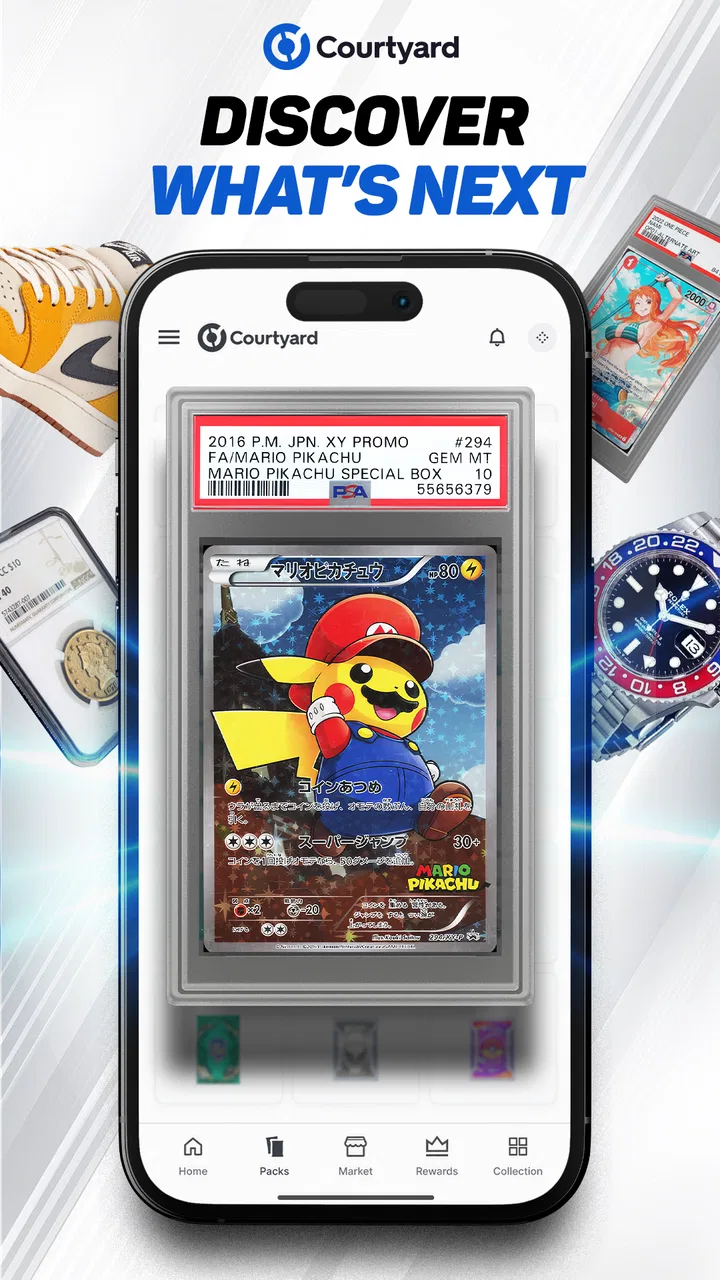
I approached Courtyard - Trading Cards as a shopping app for collectors rather than as a conventional card game. That distinction matters immediately: the experience is centered on browsing and considering collectible items connected with Pokémon, baseball, NFL, comics, and coins. I found it most interesting when I treated it as a place to explore a focused collecting marketplace, not as a replacement for a general online store or a dedicated collection-management tool.
The app is free to download, and Courtyard.io is the developer behind it. It sits in the Shopping category, carries a Mature 17+ age rating, and has reached over one hundred thousand installs. Its average score is 4.2 from roughly 2.6 thousand ratings, which suggests a generally positive reception while still leaving room for different experiences depending on what a person expects from a collector-focused app.
My overall impression is that its appeal comes from concentration. Instead of throwing every possible product category at me, it points attention toward recognizable collectible subjects. That makes discovery easier for someone who already knows what they like, but it can also feel narrow if I want ordinary retail shopping, broad price comparison, or a simple way to organize cards I already own.
You May Also Like

 AccuWeather: Weather Radar
AccuWeather Review: A Quick, Clear Forecast for Everyday Decisions
For everyday plans, the best forecast is the one you can understand quickly. AccuWeather makes rain timing, radar, and local conditions easy to act on, with a few trade-offs.

 Hill Climb Racing
Why Hill Climb Racing Still Turns Crashes Into One More Run
A tiny car, a bumpy hill and one more upgrade: Hill Climb Racing keeps resurfacing because its simple chaos makes every near-miss feel personal.

 AliExpress - Shopping App
AliExpress Makes Global Shopping Feel Personal, but Shoppers Bear the Risk
AliExpress turns a global marketplace into a pocket-sized discovery engine. Its reach is useful, its shopping loop compelling, and its trade-offs easy to miss.

 Lords Mobile: Kingdom Wars
Lords Mobile Is a Kingdom-Building Routine, Not a Quick Match
A case-by-case verdict on the building, battles, device demands, and social commitments that make Lords Mobile rewarding for some players and exhausting for others.

 PDF Scanner app - TapScanner
TapScanner Makes Paperwork Easier to Capture, Check, and Share
TapScanner makes scanning with a phone feel less like a rescue operation and more like a dependable step in getting work done. Its capture tools are useful, though not flawless.

 Block Blast!
 Shows How Much a Puzzle Game Can Leave Out
A quiet grid game shows why puzzle players increasingly value instant clarity, repeatable skill and low-pressure play—and where the genre still needs to catch up.
More From Our News Desk
View All News


How the app feels to read and navigate
I find that reading and navigating a collector-focused app works best when I set one question before I start: which subject am I here to explore, and what details would make an item worth a closer look? That small habit gives each browsing session a useful shape instead of letting appealing images pull me in every direction. It also sets up a practical look at how the experience fits different abilities and everyday situations.
A focused starting point for collectors
The clearest way to use the app is to begin with a specific interest. If I am thinking about Pokémon cards, sports cards, comics, or coins, the subject-based focus gives me a more useful starting point than a general shopping app would. I can approach it with a question such as “What collectible category do I want to investigate today?” rather than opening an enormous catalog with no obvious direction.
That focus also makes the app easier to understand for a newcomer who may not know the wider collectible market. The subject areas provide familiar reference points, while the shopping context signals that I am looking at items to consider rather than entering a traditional match or opening a digital card battle. Anyone expecting a game should adjust that expectation before spending time inside the app.
I found that readability in a collector marketplace depends on more than large labels. The important information is the relationship between the item, its category, and the action I am considering. A good browsing session should let me pause, inspect an item, and decide whether it deserves further attention without feeling pushed into a quick choice. That slower rhythm suits collecting, where the difference between an exciting find and an unsuitable purchase can be quite small.
Useful habits for clearer browsing
My first practical tip is to choose one collecting theme per session. Moving repeatedly between Pokémon, NFL, baseball, comics, and coins can make browsing feel less purposeful, especially when I am comparing items with very different reasons for appeal. A narrow session helps me remember what I am actually looking for and reduces the temptation to treat every interesting listing as equally relevant.
I also recommend reading item information before relying on the image. Collectibles are visual by nature, so it is easy to respond to a familiar character, player, team, or design before thinking about condition, context, or personal collecting goals. I would use the image to attract my attention, then use the written details to decide whether the item belongs on my shortlist.
For users who find dense screens tiring, a deliberate pause is more helpful than rapid scrolling. I would open one promising item at a time, review it, and return to the broader browsing view only after deciding whether it is worth remembering. This is not a special accessibility mode; it is simply a calmer workflow that can make a visually busy shopping experience easier to manage.
Who benefits from this structure
The app makes the most sense for a collector who enjoys browsing themed items and is comfortable making decisions from product information. It can also suit someone who wants to investigate a new category without visiting several unrelated retail sites. A parent or gift buyer, however, should pay attention to the Mature 17+ rating rather than assuming that recognizable Pokémon or sports imagery makes the entire experience suitable for children.
I would be more cautious recommending it to someone who wants a basic shopping app with familiar retail conventions. If the goal is to compare everyday products, track household purchases, or find the lowest price across a broad range of sellers, a general marketplace is likely to be more practical. The narrower collector orientation is the reason to use this app, not an incidental detail.
Access across abilities and everyday situations
I think access is not just about screen controls; it is also about having enough time and attention to make a considered choice. A quiet moment can make it easier to compare collectible details, while interruptions or fatigue can turn a pleasant browse into a confusing one. With that in mind, I’ll look at the settings and routines that can help people approach the app at a comfortable pace.
Motor considerations during browsing
Collector shopping can involve many small decisions: opening an item, returning to a category, comparing possibilities, and resisting accidental purchases. From a motor-access perspective, that means the experience is easier when I use a slow, intentional rhythm instead of repeated fast gestures. I would not recommend navigating it while walking, carrying several things, or trying to make a purchase one-handed in a hurry.
A realistic example is an evening browsing session after work. I might sit down with a specific goal, such as looking for a baseball-related collectible, and keep the app open while I compare a few possibilities. In that setting, I have time to read and reconsider. The same process would be much less comfortable on public transport, where movement, interruptions, and limited hand position make careful item review harder.
For users with limited dexterity or hand fatigue, the key trade-off is control versus speed. I would keep the number of items under consideration small and avoid treating scrolling as the main activity. A short list of candidates is easier to revisit than a long stream of products that must be searched through again. This approach also reduces the chance of confusing an item that looked appealing several screens earlier with the one I actually intended to examine.
People using alternative input methods may need to judge the app through their own device setup and comfort. I would not assume that every gesture, control, or screen arrangement will feel equally convenient for every person. The safest approach is to explore the browsing flow before making any serious collecting decision, especially if precise touch interaction is difficult.
Visual and sensory load
Images are naturally central to trading-card and memorabilia shopping, so the visual side of the app deserves attention. Bright artwork, team colors, comic designs, and recognizable characters can make discovery enjoyable, but visual variety can also become tiring. I found it more manageable to treat the catalog as something to inspect in short sessions rather than as an endless feed to consume.
Someone sensitive to motion, contrast, or crowded screens should use the device’s own display and text settings where they help. I cannot treat those system settings as a guarantee that every part of the app will become equally comfortable, but they can make a broader difference across the phone. I would also avoid browsing when tired, because fatigue makes small text and competing visual elements harder to judge accurately.
For readers with low vision, the most important practical rule is not to make a decision from a thumbnail alone. A collectible image can communicate subject and style, but it may not communicate every detail that affects suitability. I would enlarge the device display if needed, inspect the item information carefully, and take extra time before treating an attractive image as a purchase candidate.
For users who are sensitive to sound or prefer quiet environments, I would use the app in a setting where notifications and surrounding distractions are under control. Shopping for collectibles does not need to be rushed, and a quiet session makes it easier to separate genuine interest from impulse. This is particularly useful when the category itself triggers nostalgia or excitement.
Access when attention is limited
The app can be useful in short, purposeful sessions, but it is not the kind of tool I would open without a plan when my attention is already scattered. Collectibles invite browsing, and browsing can quietly expand into a much longer session. My workaround is to decide on a category and a reason before opening it: research a subject, look for a gift idea, or inspect a particular type of collectible.
This approach helps people who are easily distracted by visually appealing products. It also helps experienced collectors avoid buying simply because an item is familiar. A written note with the category, theme, and maximum amount I am comfortable considering can act as a useful boundary, even though that note lives outside the app.
Situational access and the right moment to use it
Courtyard is best used when I have stable attention, enough time to read, and a reliable connection. I would not choose it for a rushed decision in a noisy queue or for browsing while multitasking. The app’s subject matter rewards concentration, and a distracted session can lead to a weaker comparison between items.
It is also worth separating discovery from decision-making. I might browse during a break, save the idea mentally, and return later when I can review the item more carefully. That two-stage workflow is one of the most useful ways to reduce pressure: the first session is for finding possibilities, while the second is for deciding whether the possibility still makes sense.
This matters for gift buyers. Someone shopping for a sports fan may recognize a team or player but not understand the collector’s preferences. I would use the app to learn which subjects are available, then confirm the recipient’s interests before committing. A visually impressive item is not automatically a good gift for a person who collects only a particular sport, era, character, or type of card.
Where the experience still creates barriers
The biggest barrier is expectation. The short store description is simply “Courtyard,” while the broader summary points toward Pokémon, baseball, NFL, comics, and coins. That combination may leave a first-time visitor unsure whether the app is a game, a marketplace, or a collection service. I understood it more clearly once I treated it as shopping for collectibles, but that distinction should be kept in mind before downloading.
The Mature 17+ rating is another practical boundary. It means I would not hand the phone to a younger collector without adult judgment, even if the person is interested in Pokémon or sports. Families looking for a child-friendly collecting experience should consider a service designed and labeled for that audience instead.
There is also a knowledge barrier. A person who already understands card collecting may know what details deserve scrutiny, while a newcomer may focus too heavily on the subject shown in the image. I would not use the app as my only source of education about collectible value. Before spending money, a beginner should learn the basic vocabulary and decide what “worth it” means personally: rarity, condition, favorite subject, long-term collecting, or simply enjoyment.
Another limitation is that this is not the right tool for every collecting workflow. If I need a detailed inventory of items already in my possession, a specialized collection-management app may be better. If I want broad resale research, price history, or a large general marketplace, another service may provide a more suitable comparison environment. Courtyard’s strength is its curated subject focus, and that strength becomes a weakness when the task moves beyond focused discovery and shopping.
How it compares with familiar alternatives
Compared with a general marketplace, Courtyard feels more intentional for a collector because its themes narrow the search. A general marketplace is usually better for variety, routine purchases, and side-by-side comparison across unrelated sellers or product types. I would open Courtyard when I want to explore collectible subjects; I would choose the general marketplace when I want the widest possible shopping utility.
Compared with a card database or collection tracker, this app serves a different purpose. A tracker is better for recording what I own, identifying gaps, and maintaining a personal inventory. Courtyard is more relevant when I am looking outward toward items I may want to explore or obtain. Using both kinds of tool can make sense, but I would not expect one to replace the other.
Compared with browsing collectibles through social media, the app offers a more direct shopping context. Social platforms can be useful for community discussion and discovery, but they also mix products with unrelated content and opinions. Courtyard is a better fit when I want to stay focused on collectible categories, while social media may be better for conversation, trends, and personal recommendations.
Version, cost, and suitability
The app is free, which makes trying the browsing experience relatively easy. Free access does not remove the need for careful shopping judgment, though. I would still separate the decision to install the app from the decision to purchase a collectible. Those are different choices, and the second deserves more attention than the first.
The current version is 1.7.00, and the listed minimum operating system is Android 7.0. That means the app is positioned to support older Android devices, although the practical experience can still vary with screen size, performance, display settings, and the user’s preferred input method. I would update the app through the normal store process and test the basic browsing flow before relying on it for an important purchase.
My inclusive verdict
I recommend Courtyard - Trading Cards to adults who want a focused way to browse collectibles tied to Pokémon, baseball, NFL, comics, and coins. Its strongest quality is the clear collecting angle: I can approach it with a subject in mind instead of wandering through an ordinary retail catalog. The free entry point also makes it easy to decide whether that style of shopping suits me.
I would recommend using it deliberately rather than impulsively. Pick one category, inspect items beyond their images, take breaks when the screen becomes tiring, and separate discovery from the final decision. Those habits make the app more manageable for different attention levels and everyday contexts, even though they are not substitutes for built-in accessibility features.
I would skip it if I need a child-oriented experience, a general shopping service, or a complete inventory system for cards I already own. I would also choose another option if I need extensive market research or a community-first collecting environment. The best reason to use Courtyard is focused collectible discovery, not all-purpose shopping.
For me, that makes it a worthwhile niche app rather than an essential tool for every collector. It is most comfortable in a calm, intentional session, with realistic expectations about what a shopping-focused collectible app can do. If that matches the way you collect, Courtyard.io has a clear place in your routine; if your needs are broader, a general marketplace or dedicated collection tracker will probably serve you better.
FAQs for Courtyard - Trading Cards
01What is Courtyard - Trading Cards?
Courtyard - Trading Cards is a digital collectibles platform focused on trading cards and other collectible items. It allows users to discover, collect, view, and potentially trade card-based assets through a mobile-friendly experience. Before downloading, users should understand that availability, card ownership features, and marketplace functions may depend on their region, account status, and the specific collections supported by the app.
02Do I need an account or wallet to use Courtyard - Trading Cards?
You will generally need to create an account to access the app’s main features, manage your collection, and interact with available trading or marketplace tools. Some digital collectible platforms may also use a wallet or account-based custody system, so the setup process can involve identity verification, payment details, or additional security steps. Read the platform’s terms carefully before purchasing or transferring anything.
03Can I buy, sell, or trade cards in the app?
Courtyard - Trading Cards may provide tools for exploring collectible cards and participating in buying, selling, or trading activities, depending on the collection and marketplace availability. Rules, fees, payment methods, and supported regions can vary. Users should check the final transaction price, service charges, delivery or redemption conditions, and any restrictions before confirming a purchase or listing an item.
04Are the cards physical, digital, or both?
The app is designed around digital ownership and collectible card experiences, but certain cards or collections may be connected to physical items, redemption options, or real-world memorabilia. The exact format depends on the individual listing. Always review the card description to determine what you are receiving, whether a physical item is included, and whether ownership can be transferred.
05Is Courtyard - Trading Cards safe for beginners?
The app can be approachable for users who are new to digital collectibles, but beginners should take time to understand marketplace pricing, ownership terminology, transaction fees, and account security. Collectibles can fluctuate in value, and purchases may not be reversible. Use a strong password, enable available security features, avoid sharing login information, and only spend money you can afford to lose.
Pros
- Clean interface makes browsing and managing card collections straightforward.
- Supports quick card searches
- useful for checking specific items on the go.
- Helpful for organizing cards without relying on physical binders or spreadsheets.
- Trading-focused features can make it easier to connect with other collectors.
- Convenient mobile access for reviewing collection details anywhere.
Cons
- Some features may require an account or additional setup before use.
- The experience depends heavily on an active collector community.
- Card information may be incomplete or vary in accuracy between listings.
- Advanced collection tools may feel limited for large
- highly organized inventories.
- Users may encounter occasional loading delays when browsing extensive card data.

Courtyard - Trading Cards
Gallery